Free Youtube Transcript Generator

Generate accurate transcripts from YouTube videos in seconds with our AI-powered YouTube video transcript - convert your videos to text and easily access key points.

Example:

130K+Videos Transcribed

1M+Hours Saved Monthly

4.9Chrome Store Rating

Transcribe a YouTube video to text within a few minutes

You'll find the best way to transcribe a long YouTube video that suits your native language - Lunote is a YouTube transcript extractor with a wide range of accurate transcripts for content creation.

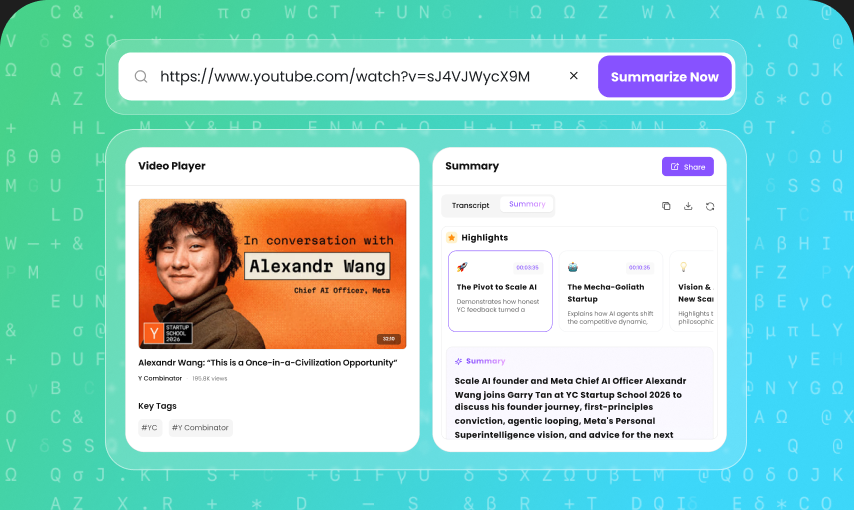
Link-Based YouTube Transcription

Paste a public YouTube link and generate the transcript without downloading the video first. Lectures, interviews, tutorials and podcasts can move from spoken content to readable text in one workflow. This saves the repeated pause-and-type routine, particularly when the recording is long or you only need a few specific sections.

Timestamped Transcript

The transcript is organised around timestamps rather than presented as one disconnected block. Each time marker gives you a route back to the matching point in the video. It is useful when a quotation needs confirmation, a sentence sounds unclear or an on-screen example adds information that the spoken words do not contain.

Searchable Video Text

Once the video becomes text, you can scan for a name, topic or phrase instead of moving through the timeline by hand. A long lecture becomes easier to navigate, and an interview can be searched for the sections that matter to an article or set of notes. The text also gives later summarising and review a clearer starting point.

Transcript and Video Review

Lunote keeps the transcript connected to the source video, making it easier to read and listen together. Automatic transcription may mishear an accent, number or unfamiliar term even when the surrounding sentence looks reasonable. Opening the matching moment usually resolves the uncertainty faster than trying to guess from the transcript alone.

Names and Key-Term Checking

Proper names, dates, figures, product names and technical vocabulary carry more weight than ordinary connecting words. They are also among the easiest details to transcribe incorrectly. The timestamped layout helps you find and check these points before the text is quoted, published or reused in another piece of content.

Copyable Transcript Output

Copy the complete YouTube transcript or take only the passages needed for the next task. Students can build notes, editors can collect quotations and content teams can prepare captions or outlines. Because the timestamps remain available, the copied text does not have to become separated from the video evidence behind it.

3 Steps to Generate YouTube Transcripts

Step 1: Input URL or Search Video

Copy and paste a YouTube link, or use keyword search to find the exact video without leaving the page.

Step 2: Generate with One Click

Start the AI engine. Within seconds it processes the audio—even for long videos—to produce an accurate transcript.

Step 3: Translate, Copy, or Export

Switch between original and translated text, then copy the transcript or export it in TXT format.

Who Is This YouTube Transcript Generator For?

Students

Students can use a YouTube transcript generator to turn lectures, tutorials, educational videos, and presentations into searchable study materials. Instead of repeatedly watching a long video, you can quickly find important concepts, review specific sections, and copy useful quotes or notes for your studies.

Researchers & Academics

Researchers can extract spoken content from interviews, lectures, conferences, documentaries, and educational videos for analysis and reference. Timestamped transcripts make it easier to locate specific statements and verify information without manually searching through an entire video.

Content Creators

YouTubers, bloggers, and social media creators can use transcripts to repurpose existing video content into blog posts, newsletters, social media posts, video descriptions, captions, and other content formats. A single YouTube video can become a useful source for multiple pieces of content.

SEO & Marketing Professionals

SEO specialists and marketers can extract the spoken content from videos to identify topics, questions, keywords, and useful insights. Transcripts can also serve as a starting point for creating articles, content briefs, social media posts, and other search-focused content.

What People Say About Us

Rachel P.

History Student

The timestamps let me jump back to the exact part of a lecture instead of scrubbing through the whole video again.

Ian G.

Podcast Producer

I search the transcript for possible quotes, then listen back at the timestamp before using anything in show notes.

Lila M.

Market Researcher

Interview videos become much easier to scan once the conversation is searchable. I can group recurring language before doing a closer listen.

Kevin T.

Course Creator

A transcript gives me a quick route from recorded lesson to outline. I review names and technical terms before turning it into materials.

Aya N.

Language Learner

Reading along with the video helps me catch phrases I missed by ear. Timestamps make it easy to replay only the difficult lines.

Explore More YouTube Transcript Tools

Keep working after you get the transcript. Summarize videos, generate transcripts in bulk, analyze key points, download subtitles, or turn transcripts into reusable notes.

AI Detector

AI Humanizer

Undetectable AI

Ask AI

YouTube Transcript

Frequently asked questions

A YouTube transcript is a written version of the spoken content in a YouTube video. It converts the video's audio into searchable text, making it easier to read, analyze, summarize, translate, or reuse video content. A transcript typically includes the dialogue from the video and may include timestamps for easier navigation.